.newpost

This post demonstrates the successful completion of adding new code within the post loop of the (book recommended) Twenty Twelve child theme index.php file; and hard coding the following CSS style rules into the Twenty Twelve child theme style.css file.

.newpost {
padding: 8px;
border: 2px solid darkgray;
border-radius: 10px;
background-color: lightyellow;
margin-bottom: 50px;
}

.newpost h1 a {
font-size: 2.5em;
color: red;
}
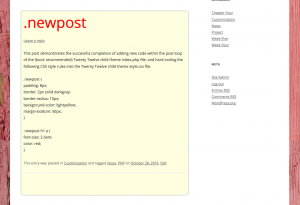
loop and css code successful results

2012 loop and css code successful results
Save

Delving into the Loop

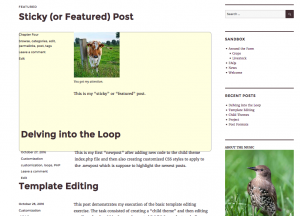
This is was my first “newpost” after adding new code to the Twenty Sixteen child theme index.php file and then coding customized CSS styles to apply to the new class named .newpost. It was suppose to highlight the most recent news post on the page. (Classroom assignment to complete the exercise from the WordPress: The Missing Manual book.) As you can see from the image below I failed at getting it to work properly.

failed php loop and css attempt in 2016 theme

failed php loop and css attempt in 2016 theme

Template Editing

This post demonstrates my execution of the basic template editing exercise. The task consisted of creating a “child theme” and then editing one line of code within the newly created “child theme footer.php” document file.

1) Remove the standard language “Proudly powered by WordPress”

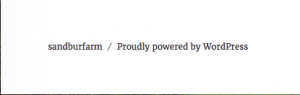
Standard Theme Twenty Twelve Footer Template message

Standard Theme Twenty Twelve Footer Template message

2) Replace it with “© Copyright by ‘myself'”language


Child Theme Twenty Sixteen Footer Template message

Child Theme Twenty Sixteen Footer Template message

Save

Save

Save

PHP include

This assignment was designed to learn and then put into practice utilizing php code to call common sections of web pages to load. A much more efficient way to code.

I began this project by customizing a standard html Bootstrap template file (Jumbotron)  named starter.html

Once the starter file was completed I divided the one file into three separate files with the end result being my php include example page.